
Receiving and displaying Webmentions using PureBlog
This website receives Webmentions and interactions from the fediverse, and displays them as Webmentions. Here I try to document how my set up works in PureBlog, and I'll return to describe how to directly send Webmentions in a subsequent article.
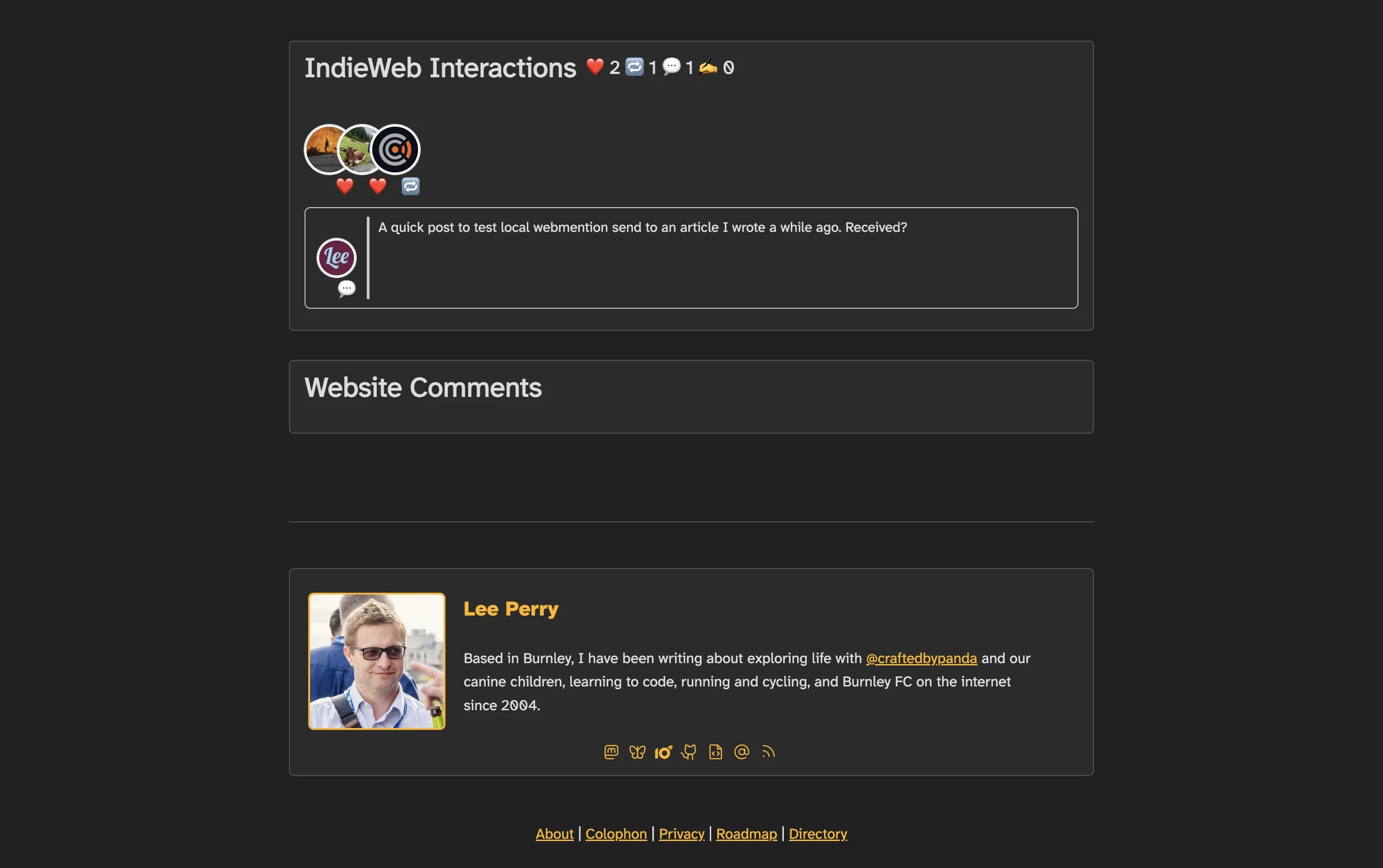 Webmentions being received on a post on this website
indieAuth
You need to be able to login to some of the services identified below using your domain through indieAuth. So before getting started it is worth making sure that your website is setup to do this.
I have a social footer menu on my page which contains all of my rel="me" links, though in practice you could place this anywhere on your page, including in the post/page footer html inserts from the PureBlog settings > site menu. Simplified code:
<div class="social">
<a href="https://social.lol/@li" class="u-url" rel="me">🐘</a> |
<a href="https://bsky.app/profile/lee-perry.co.uk" class="u-url" rel="me">🦋 </a> |
<a href="https://github.com/lee-perry" class="u-url" rel="me">🧑💻</a> |
<a href="https://codeberg.org/leeperry" class="u-url" rel="me">🧑💻</a> |
<a href="mailto:<?= $_encoded ?>" rel="me">✉️</a>
</div>You also need to make sure that the services links back to your website
When I do login through indieAuth it is usually only the github and occasionally the email service that I am able to use to login.
Receiving Webmentions
Your website needs a webmention receiver to receive webmentions, I use webmention.io to provide this service. Head over there, and login using your domain, which we set up to work with indieAuth in the previous step.
Webmention.iowebmention.io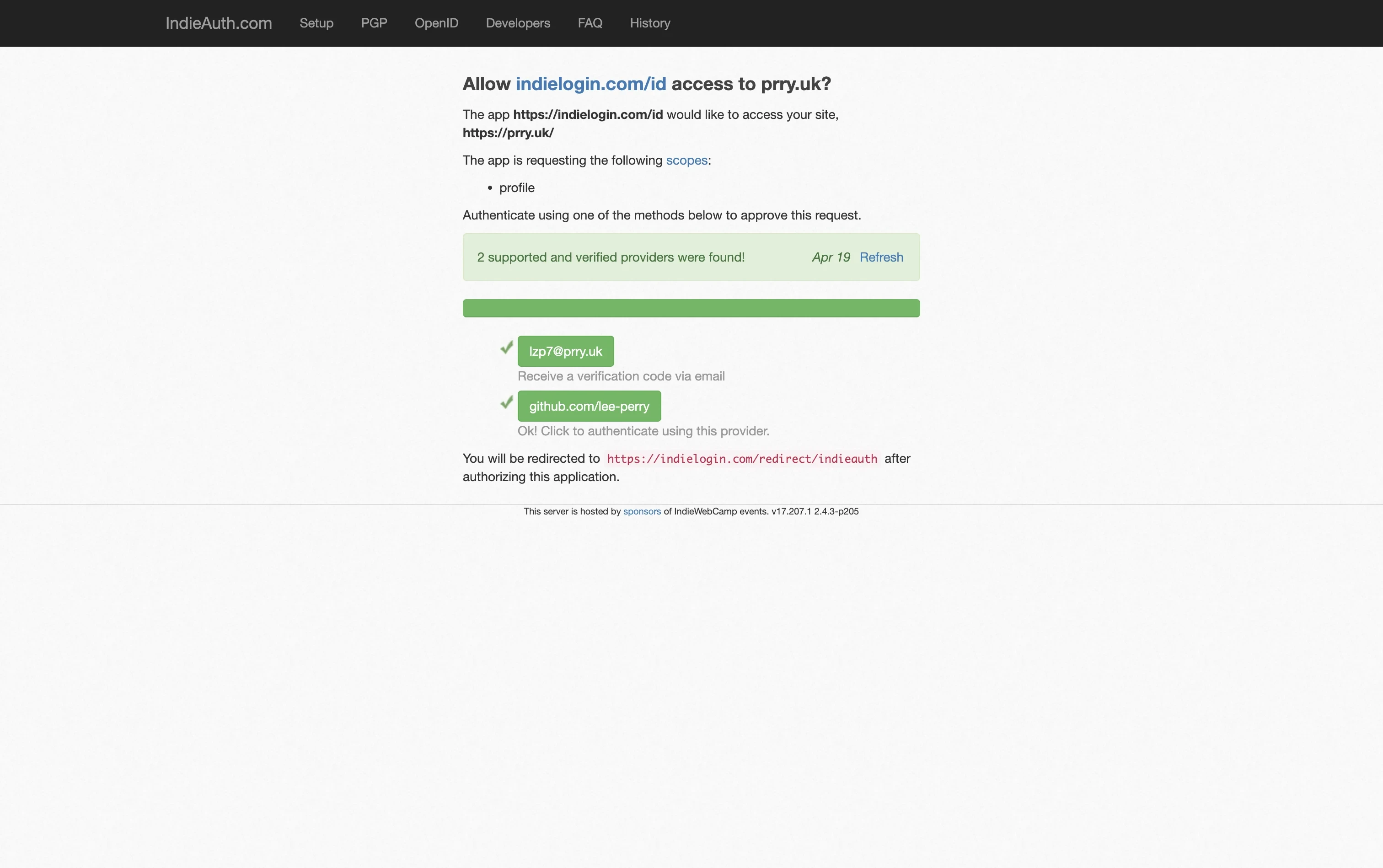
You will see that I can either send myself a verification code or login using Github. Once logged in, head over to the sites tab, and collect the setup code for your site.
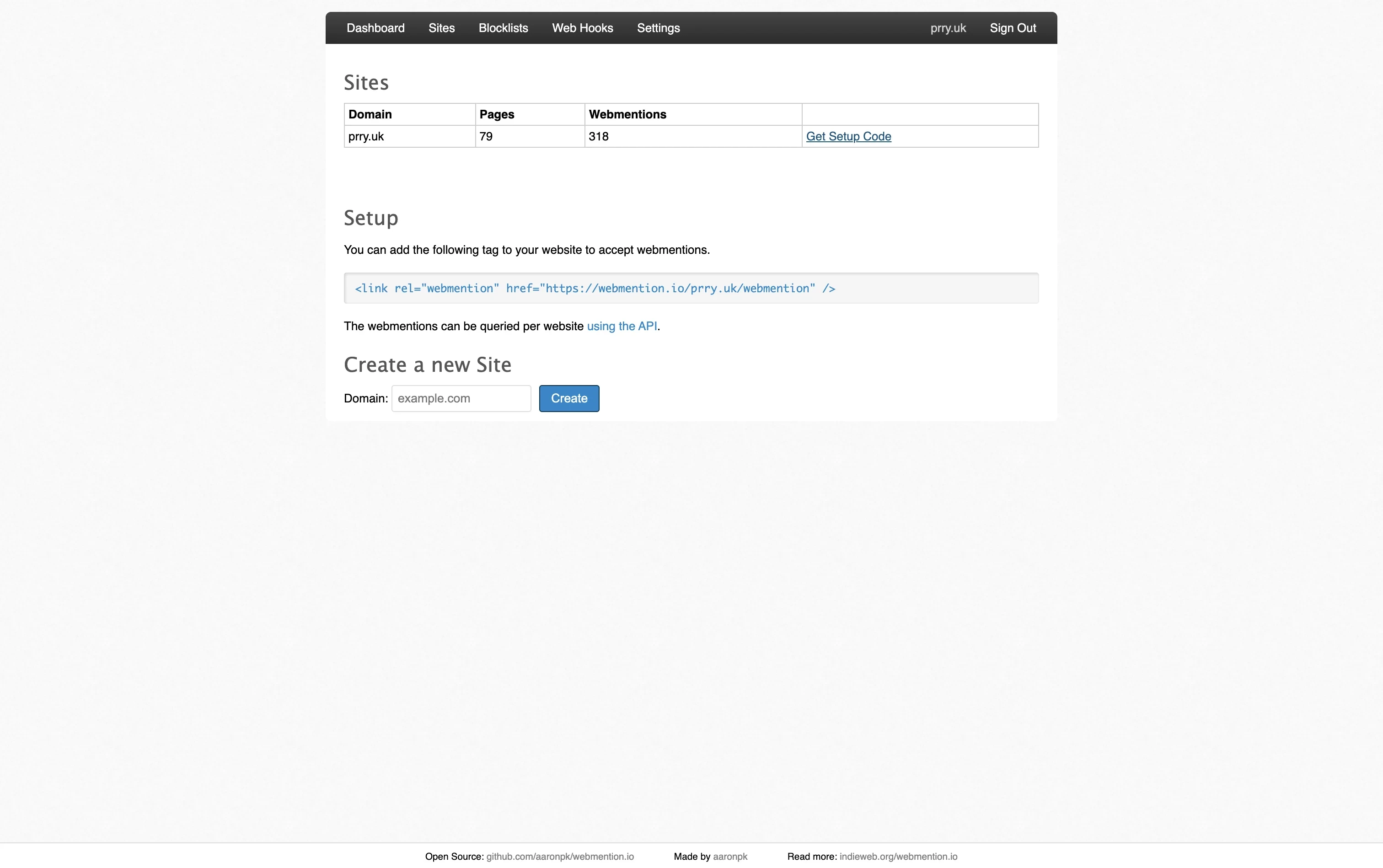
Insert that code into the Page and Post head html injects in the settings > site tab of your PureBlog admin.
Mine are as follows, including the legacy pingback insert that you can collect from the settings tab on webmention.io.
<link rel="webmention" href="https://webmention.io/prry.uk/webmention">
<link rel="pingback" href="https://webmention.io/prry.uk/xmlrpc">
<link rel="authorization_endpoint" href="https://indieauth.com/auth">
At this point the site is set up to receive webmentions through webmention.io, and they will appear on the webmention.io dashboard for you to read.
Receiving Fediverse interactions as Webmentions
My Webmention traffic is actually pretty sparse, most of the interaction with my content happens instead over on mastodon or bluesky. You can use the brid.gy service to feed these webmentions into the stream of webmentions on your webmention.io dashboard also.
 Lee Perry (@li@social.lol)388 Posts, 287 Following, 184 Followers · Based in Burnley, I talk about 🚐 exploring life with our 🐕 podenco tribe, 👨💻learning to code, 🕹️ retrogaming, 🏃♂️running, 🚴♂️cycling, 🧗♂️bouldering, ⚽️ Burnley FC, Accrington Stanley, NWCFL and the 🏉 roughyeds.social.lol
BlueskyBluesky Social · bsky.app
Head over there and login to the accounts that you want to connect using the 'Connect your Accounts' section.
To connect your mastodon account click the mastodon button, and then select the first option Cross post to a mastodon account, following the prompts to login to your mastodon account. Enable backfeeding of responses if not already enabled once you make it through to the dashboard. This will enable brid.gy to backfeed responses back to webmention.io though note that the mastodon post most contain the url of your content for this to work (otherwise the webmention will land on the root of your site instead).
To connect your blueksy account head first to bluesky, go to settings > privacy & security > app passwords, and generate an app password for bluesky to use. Make sure to copy the app password, because you will not be able to retrieve it again later. Then head back to brid.gy, and log in using your bluesky handle or custom domain, with the app password that you just generated (not the account password). Again, enable backfeeding of responses if not already enabled.
At this point your webmention.io dashboard will be populated with webmentions, bluesky and mastodon comments and interactions, but your website has way of actually displaying them yet.
Displaying Webmentions
You may want not want to display webmentions on your site, in which case there is no need to implement the following step. If you do display them though it is worth bearing in mind that bluesky and mastodon interactions and replies are being shown out of the context in which they were received - it is well worth mentioning that your privacy policy should give people a straightforward way to request removal of their mentions should they wish.
I implemented the following script directly into the post footer html section of the PureBlog settings > site tab. This is largely not my own work and is amended from previous scripts used over on bearblog by gobino and yordi which I implemented there, and on my 11ty site inbetween.
<script>
if (document.querySelector("article")?.classList.contains("note-single")) {

async function fetchInteractions() {
  try {
    const res = await fetch(
      "https://webmention.io/api/mentions.jf2?target=" +
      encodeURIComponent(location.href)
    );

    const data = await res.json();
    if (!data?.children?.length) return;

    const likes = [];
    const reposts = [];
    const replies = [];
    const mentions = [];

    data.children.forEach(child => {
      const authorUrl = child.author?.url || child["wm-source"] || "#";
      const authorPhoto = child.author?.photo || "https://via.placeholder.com/50";

      function createAvatar(emoji = null) {
        const wrapper = document.createElement("div");
        wrapper.className = "avatar-container";

        const avatarLink = document.createElement("a");
        avatarLink.href = authorUrl;
        avatarLink.target = "_blank";
        avatarLink.rel = "nofollow noopener";

        const img = document.createElement("img");
        img.src = authorPhoto;
        img.className = "webmention-avatar";
        avatarLink.appendChild(img);
        wrapper.appendChild(avatarLink);

        if (emoji) {
          const badge = document.createElement("span");
          badge.className = "avatar-emoji";
          badge.textContent = emoji;
          wrapper.appendChild(badge);
        }

        return wrapper;
      }

      switch (child["wm-property"]) {
        case "like-of":
          likes.push(createAvatar("❤️"));
          break;
        case "repost-of":
          reposts.push(createAvatar("🔁"));
          break;
        case "in-reply-to":
          const reply = document.createElement("div");
          reply.className = "webmention-reply";
          reply.appendChild(createAvatar("💬"));
          if (child.content?.text) {
            const quote = document.createElement("blockquote");
            quote.textContent = child.content.text;
            reply.appendChild(quote);
          }
          replies.push(reply);
          break;
        case "mention-of":
          const link = document.createElement("a");
          link.href = child["wm-source"];
          link.target = "_blank";
          link.rel = "nofollow noopener";
          link.textContent = child["wm-source"];
          mentions.push(link);
          break;
      }
    });

    const wrapper = document.createElement("div");
    wrapper.className = "webmentions";

    const details = document.createElement("details");
    if (replies.length) details.open = true;

    const summary = document.createElement("summary");
    // wrap the emoji + counts in a span
    summary.innerHTML = `IndieWeb Interactions <span class="counts">❤️ ${likes.length} 🔁 ${reposts.length} 💬 ${replies.length} ✍️ ${mentions.length}</span>`;
    details.appendChild(summary);

    const reactionsRow = document.createElement("div");
    reactionsRow.className = "reactions-row";
    likes.forEach(a => reactionsRow.appendChild(a));
    reposts.forEach(a => reactionsRow.appendChild(a));
    details.appendChild(reactionsRow);

    if (replies.length) {
      const repliesContainer = document.createElement("div");
      repliesContainer.className = "replies-section";
      replies.forEach(r => repliesContainer.appendChild(r));
      details.appendChild(repliesContainer);
    }

    if (mentions.length) {
      const mentionsHeading = document.createElement("p");
      mentionsHeading.textContent = "✍️ Mentions";
      details.appendChild(mentionsHeading);

      const ul = document.createElement("ul");
      mentions.forEach(m => {
        const li = document.createElement("li");
        li.appendChild(m);
        ul.appendChild(li);
      });
      details.appendChild(ul);
    }

    wrapper.appendChild(details);

    const postNav = document.querySelector("div.post-nav");
    if (postNav) postNav.parentNode.insertBefore(wrapper, postNav.nextSibling);

  } catch (err) {
    console.warn("Webmentions failed", err);
  }
}

fetchInteractions();
}
</script>
Finally, you will want to apply some styling to these lists, my css, inserted directly into the css tab within site settings is as follows:
/* ------------------------------
WEBMENTIONS / INTERACTIONS
------------------------------ */
.comments-header {
  display: none;
}

.webmentions{
  margin-top:1rem;
  font-size:0.95rem;
  max-width:100%;
}

/* header styled like h2 */

.webmentions summary{
  cursor:pointer;
  font-weight:600;
  font-size:2em;
  line-height:1.2;
  margin-bottom:0.5rem;
  display:flex;
  align-items:center;
  flex-wrap:wrap;
}

.webmentions summary .counts{
  font-size:0.67em;
  margin-left:0.5em;
}

/* ------------------------------
AVATAR STACK
------------------------------ */

.avatar-container{
  position:relative;
  display:inline-block;
  margin-left:-18px;
  min-width: 40px;
}

.avatar-container:first-child{
  margin-left:0;
}

.webmention-avatar{
  border-radius:50%;
  width:54px;
  height:54px;
  border:2px solid #fff;
  box-shadow:0 0 0 1px #ddd;
}

/* emoji overlay */

.avatar-emoji{
  position:absolute;
  bottom:0;
  right:0;
  font-size:20px;
  background:none;
  width:auto;
  height:auto;
  padding:0;
  line-height:1;
}

/* ------------------------------
REACTIONS ROW
------------------------------ */

.reactions-row{
  display:flex;
  align-items:center;
  margin-bottom:0.6rem;
}


/* ------------------------------
MENTION / COMMENT LIST
------------------------------ */

.webmentions ul{
  list-style:none;
  padding-left:0;
  margin:0.5rem 0 0 0;
}

.webmentions li{
  margin:0.75rem 0;
}


/* ------------------------------
REPLIES / COMMENTS
------------------------------ */

.webmention-reply{
  display:flex;
  gap:12px;
  margin:0.75rem 0;

  /* mini card styling */
  background:var(--accent-bg-color);
  border:1px solid var(--border-light);
  border-radius:6px;
  padding:0.6rem 0.8rem;
}

/* comment text */

.webmention-reply blockquote{
  margin:0;
  padding-left:10px;
  border-left:3px solid var(--border-light);
  font-style:normal;
  max-width: 85%
}

.webmention-reply p:first-child{
  margin-top:0;
}

.webmention-reply p:last-child{
  margin-bottom:0;
}

/* avatar inside reply */

.webmention-reply img{
  border-radius:50%;
  width:42px;
  height:42px;
  flex-shrink:0;
}
I'll return again over remainder of the weekend with a separate post on how to send webmentions directly from your PureBlog website without requiring an external service.
Hope that you find this useful, and please do let me know if anything in the above does not work as anticipated.
Leave a reply
Have your own site? Link to this page and send a webmention — it'll appear here. Otherwise, use the form.